Software development is moving beyond AI-powered code suggestions toward coding agents that can actually perform engineering tasks. Modern agents can understand a codebase, modify multiple files, run tests, debug issues, and iterate with much less step-by-step guidance from developers.
In 2026, tools such as Codex, Claude Code, Gemini CLI, Cursor, GitHub Copilot, and Windsurf are competing to make this workflow faster and more autonomous. But benchmark scores alone don't tell the full story. Pricing, usage limits, reliability, integrations, autonomy, and overall developer experience all determine whether an agent is truly worth using.
In this article, we compare 10 leading coding agents in 2026 across performance, features, pricing, strengths, limitations, and real-world use cases to see which tools deliver the most value for different types of developers.
What Is a Coding Agent?
A coding agent is an AI-powered development system that can take a software task and work through much of the process on its own. Instead of simply suggesting code or answering questions, it can understand the project, plan an approach, make changes across files, run tests, identify problems, and refine the implementation based on the results(Source:Google Cloud Docs).
Top 10 Coding Agents in 2026
1. Codex CLI
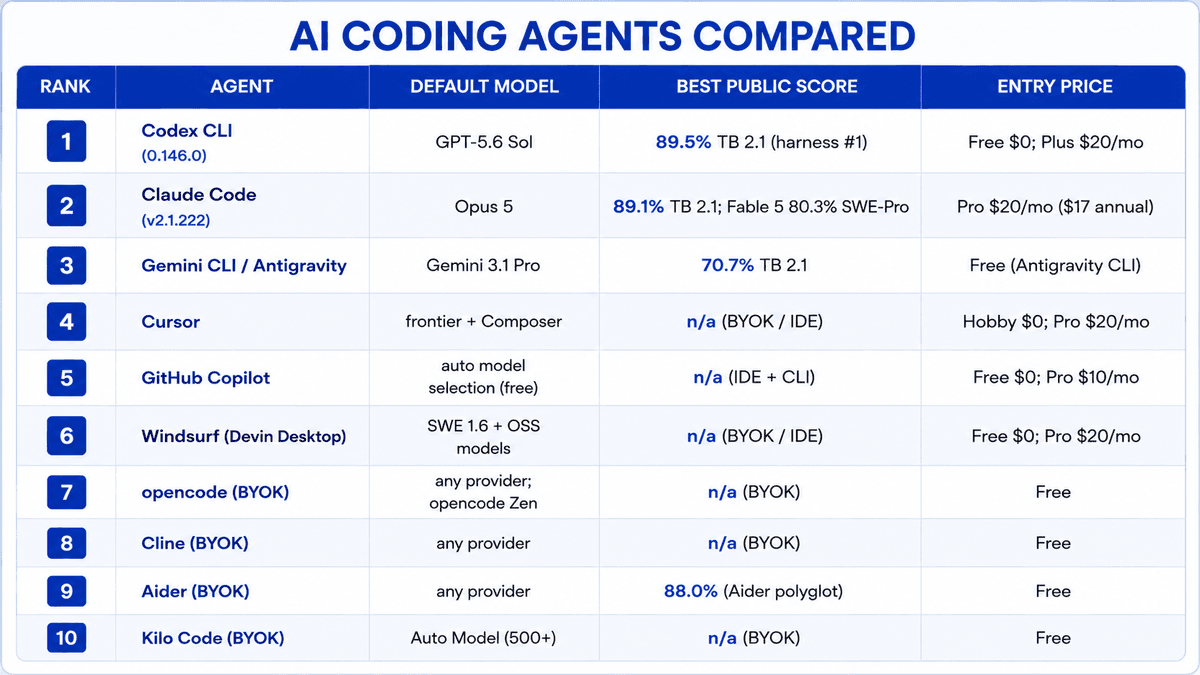
OpenAI’s open-source Codex agent is available through the openai/codex repository, with 104,106 GitHub stars, an Apache-2.0 license, and stable version 0.146.0 as of July 29, 2026.
Its default Power mode uses GPT-5.6 Sol at medium effort, while the extra-high effort configuration reaches 89.5% on Terminal-Bench 2.1. GPT-5.6 comes in three tiers: Sol ($5/$30 per 1M input/output tokens), Terra ($2/$12), and Luna ($0.20/$1.20), targeting complex, everyday, and high-volume workloads respectively.
Codex is available through the CLI, IDE extension, web cloud agent, desktop app, and iOS, with cloud-based automatic code review also supported(Source:Morph Docs).
Best For:
Developers looking for strong autonomous coding performance and terminal-based workflows.
Pricing and Limits
Codex follows a tiered ChatGPT pricing structure: Free ($0), Go ($8/month), Plus ($20/month), Pro ($100/month and up), Business ($20/user/month billed annually), and Enterprise (custom pricing). Usage is measured through messages within a shared 5-hour window.
For developers who prefer API access, Codex can also be used with an OpenAI API key and billed per token: Sol ($5/$30), Terra ($2/$12), and Luna ($0.20/$1.20) per 1M input/output tokens. However, API-key access does not include Codex’s cloud features.
2. Claude Code
Anthropic’s Claude Code is a terminal-first coding agent that is also available through VS Code, JetBrains, desktop, and web. Since July 24, 2026, its default model has been Claude Opus 5, priced at $5 input / $25 output per 1M tokens with a 1M-token context window. At maximum effort, it scores 89.1% on Terminal-Bench 2.1, while the older Opus 4.8 pairing scores 78.9%. Fable 5 is also available again and leads SWE-bench Pro at 80.3%.
The anthropics/claude-code repository has 140,331 stars and reached v2.1.222 on August 4, 2026. Unlike Codex, Claude Code is proprietary; the public repository mainly provides issues and documentation rather than the source under an open-source license.
Its feature set includes MCP, sub-agents, background and cloud sessions, CLAUDE.md memory, hooks, and skills, making it well suited for complex, multi-step development workflows(Source:Morph Docs).
Best For:
Complex, multi-step software engineering tasks and large codebases.
Pricing and Limits
Claude Code is included with Claude Pro, which costs $20/month on a monthly plan or $17/month when billed annually. Max starts at $100/month, while the Max 20x plan costs $200/month. Usage is managed through a 5-hour rolling session window along with a weekly limit, shared across Claude.ai, Claude Desktop, and Claude Code under the same subscription. The free Claude.ai plan does not provide access to Claude Code.
For organizations and developers using cloud infrastructure, Claude Code is also available through Amazon Bedrock, Google Vertex AI, and Microsoft Foundry. Its terminal CLI and VS Code extension can additionally work with third-party model providers.
3. Gemini CLI / Antigravity CLI
Google’s Gemini CLI is an open-source coding agent available through the google-gemini/gemini-cli repository, which has 106,374 GitHub stars and uses the Apache-2.0 license. On June 18, 2026, Google moved free, Google AI Pro, and Ultra users from Gemini CLI and Gemini Code Assist to the newer Antigravity CLI, while enterprise access through Code Assist Standard and Enterprise remained unchanged. Before the change, personal Google accounts received a free allowance of 60 requests per minute and 1,000 requests per day.
Both Gemini CLI and Antigravity use Gemini 3 models with automatic routing, including Gemini 3 Pro and Gemini 3 Flash. They provide a 1M-token context window, along with MCP, Google Search grounding, shell access, and file tools. With Gemini 3.1 Pro, the pairing achieves 70.7% on Terminal-Bench 2.(Source:Morph Docs)1.
Best For:
Developers who want a capable coding agent with a strong free-entry option.
4. Cursor
Cursor is a VS Code-based editor built around an agent-first development workflow and is now operated by Anysphere, which has also acquired Continue.dev. Its individual plans start with Pro at $20/month, including $20 of API-rate usage, followed by Pro+ at $60/month with $70 of usage and Ultra at $200/month with $400 of usage. The Teams plan costs $40/user/month.
Cursor also offers its in-house Composer models through a separate, more generous usage pool designed for everyday agentic coding at a lower cost than using frontier models directly through APIs. A free Hobby tier provides limited Agent requests and Tab completions without requiring a credit card.
Paid plans add access to frontier models, MCP support, cloud agents, and Bugbot code reviews, with additional usage billed according to the applicable usage-based pricing(Source:Morph Docs).
Best For:
Developers who prefer an AI-native IDE with powerful agentic coding features.
5. GitHub Copilot
GitHub Copilot now uses GitHub AI Credits, replacing the previous premium-request system, with 1 credit equal to $0.01 of model usage. The Free plan offers 2,000 code completions per month, while Pro costs $10/user/month and includes unlimited completions, the cloud agent, and 1,500 monthly credits. Pro+ costs $39/month with 7,000 credits, while Max costs $100/month with 20,000 credits and premium model access.
For organizations, Business costs $19/user/month and Enterprise $39/user/month. Credits are consumed based on model token usage, while regular code completions and next-edit suggestions remain unlimited on paid plans and don't consume AI Credits(Source:Morph Docs).
Best For:
Teams and developers already working heavily within the GitHub ecosystem.
6.Wind Surf (Devin Desktop)
Cognition, the company behind Devin, has integrated Windsurf into Devin Desktop, with the former Windsurf pricing page now redirecting to Devin’s pricing. The previous free Windsurf editor has effectively become the Devin Free tier, offering unlimited Tab completions and inline edits, along with a limited agent quota and restricted model access.
Devin Pro costs $20/month and provides full model access, free usage of SWE 1.6 and leading open-source models, plus Devin Cloud agents. For heavier workloads, Devin Max costs $200/month with significantly higher usage limits, while Devin Teams costs $80/month plus $40/month per full development seat(Source:Morph Docs).
Best For:
Developers looking for an agent-focused desktop environment with cloud coding capabilities.
7. OpenCode
OpenCode, maintained in the anomalyco/opencode repository, has grown to 193,678 GitHub stars under the MIT license and released v1.18.13 on August 4, 2026. Its star count currently puts it ahead of Claude Code (140,331), Gemini CLI (106,374), and OpenAI Codex (104,106).
The agent is terminal-native, with additional access through a desktop app and IDE extension. One of its main advantages is its model-agnostic design: developers can connect virtually any LLM provider using their own API keys, while local models can also be run through Ollama and LM Studio.
OpenCode also offers opencode Zen, a curated and tested selection of models optimized for agentic coding. Additional capabilities include MCP servers, LSP servers, and sub-agents, giving developers considerable flexibility over how their coding environment is configured(Source:Morph Docs).
Best For:
Developers who want maximum model flexibility through BYOK and local LLM support.
8. Cline
Cline is an open-source coding agent available through the cline/cline repository, with 65,680 GitHub stars under the Apache-2.0 license. The tool itself is free to use, with users paying only for the inference they consume rather than a monthly subscription.
Its model-agnostic approach lets developers connect their own API keys from providers including Anthropic, OpenAI, Google, OpenRouter, AWS Bedrock, GCP Vertex, Groq, Cerebras, and DeepSeek. Local models are also supported through Ollama and LM Studio.
Cline is available as a VS Code/IDE extension, SDK, and CLI. Its Plan and Act modes give developers more control by requiring approval before changes are made, making it useful for those who want agentic coding without giving the agent unrestricted control(Source:Morph Docs).
Best For:
Developers who want open, model-agnostic coding with control over every change.
9. Aider
Aider is an open-source, terminal-based coding agent available through the Aider-AI/aider repository. It has 47,956 GitHub stars under the Apache-2.0 license and follows a free, BYOK, model-agnostic approach.
Known for its Git-focused workflow, Aider treats Git as a core part of the development process, with changes tracked through commits. It also maintains the Aider Polyglot leaderboard, which evaluates models across 225 Exercism exercises covering C++, Go, Java, JavaScript, Python, and Rust. On the leaderboard, GPT-5 (high) leads with 88.0%, followed by o3-pro (high) at 84.9% and Gemini 2.5 Pro at 83.1%(Source:Morph Docs).
Best For:
Terminal-based developers who want a Git-centric AI pair-programming workflow.
10. Kilo Code
Kilo Code is an open-source coding agent maintained through the Kilo-Org/kilocode repository, which has 26,720 GitHub stars under the MIT license. The project is available as a free extension for VS Code and JetBrains, as well as through the CLI, while AI usage is billed separately. The domain kilocode.ai now redirects to kilo.ai.
Its Kilo Gateway follows a pay-as-you-go model with 0% markup, routing requests across 500+ models from more than 60 providers. Developers can use its Auto Model selector, which offers Frontier, Balanced, and Free options based on the workload.
Kilo Code also supports BYOK for providers such as Anthropic, OpenAI, Google, Azure, and Bedrock. For local development, models can be connected through Ollama or LM Studio, giving developers flexibility over both model choice and infrastructure(Source:Morph Docs).
Best For:
Developers who want access to hundreds of models with flexible BYOK and local-model options.
How Armor Tech Can Help
Choosing the right coding agent is only one part of building an effective AI-powered development workflow. Armor Tech helps businesses move from experimenting with AI coding tools to actually using them in production. Our team can integrate coding agents into existing development workflows, connect the right AI models and APIs, build custom AI-powered applications, and automate repetitive engineering tasks. Whether a company needs an AI coding assistant, agentic software development workflow, custom LLM integration, or a complete AI solution, Armor Tech focuses on making these technologies practical, scalable, and aligned with real business needs.
References
Morph Documentation
https://www.morphllm.com/ai-coding-agent#pricing
Google Cloud Documentation
https://cloud.google.com/discover/what-is-agentic-coding