What Is Real‑Time Screen Annotation?
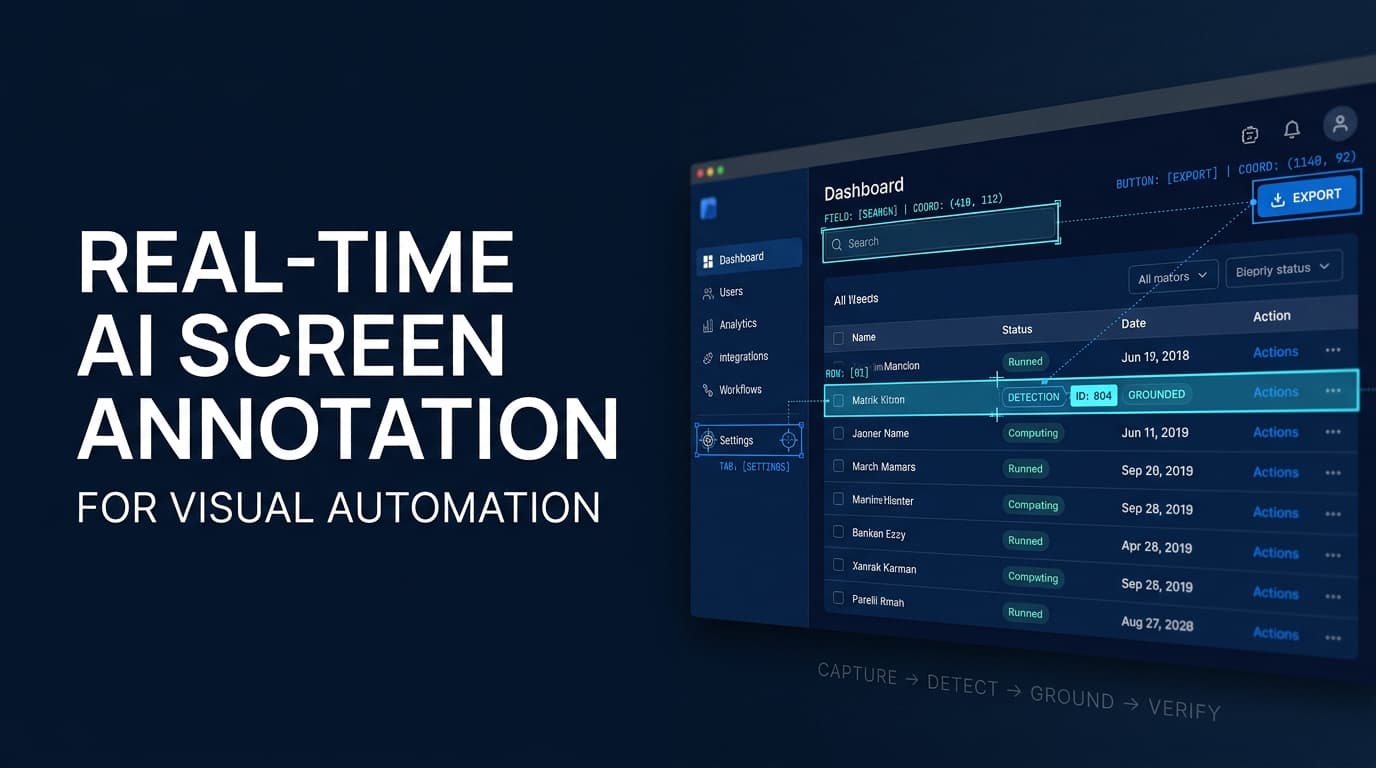
Real‑time AI screen annotation captures what a user sees on a monitor as frames are generated and runs a visual model over those frames to produce overlays, highlights, or textual notes. The annotations appear instantly on the display, allowing an automation agent to interact with UI elements that change dynamically. This capability matters because it turns a static screenshot into a living view of the application state, enabling context‑aware automation that can react to visual changes without waiting for fixed identifiers.
Core Architecture of AI Visual Agents
A typical visual agent is built from four layers. The first layer is a screen capture module. On Windows, the Windows Graphics Device Interface (GDI) or Direct3D APIs can be used to retrieve pixel data. On macOS, the Core Graphics framework provides a comparable interface. Linux implementations often rely on X11 or Wayland screencasting services. The module runs continuously and can be configured to capture the entire desktop, a single window, or a region of interest.
Following capture, a model for visual understanding processes each frame. Modern CNNs handle object detection and segmentation, while transformers excel at optical character recognition (OCR) and layout analysis. The model can be hosted locally on a GPU‑enabled workstation or dispatched to a cloud inference endpoint, depending on latency tolerance and data sensitivity.
The third component is an annotation engine that receives the model’s output and renders it on the screen. Rendering can be done via platform‑specific drawing APIs (e.g., Win32 UpdateWindow, macOS CGContext, X11 XPutImage). The engine also emits events such as “button identified”, “error highlighted”, or “text extracted”. Those events are stored in an in‑memory queue for downstream consumption.
Finally, an integration layer exposes the events to external workflow tools. A simple HTTP server can listen for POST requests that carry annotation payloads. Alternatively, a socket connection can stream updates in real time. The integration layer is responsible for mapping annotation types to workflow‑specific data shapes.
Connecting Visual Agents to n8n and Make Workflows
Once the visual agent can emit events, the next step is to bring those events into an automation platform. Both n8n and Make support webhooks as first‑class triggers. An endpoint URL is configured inside the visual agent; each annotation batch is POSTed as JSON. The payload can contain fields such as timestamp, annotation_type: e.g., highlight, ocr, region, confidence_score, and image_base64 for optional reference.
Inside n8n, a Webhook node receives the payload and fans out to subsequent nodes. A Function node can transform raw annotation data into a structured format that matches downstream expectations. For visual testing, the transformed data can be fed into an HTTP Request node that calls an existing test runner API. In Make, the equivalent pattern uses an “HTTP” action as the trigger and a “Code” step for data shaping.
Annotation events can also be filtered before entering the workflow. A simple condition node in n8n can check annotation_type equals error and forward only those to a debugging lane. This selective routing reduces noise and lets teams build separate processes for documentation generation, UI validation, and interactive guidance.
Captured frames and annotations are often needed as inputs for other tools. The integration layer can expose a REST API that returns the most recent annotated screenshot or a list of all annotations for a time window. Workflow steps that require image processing (e.g., resizing, OCR enhancement) can call this API and continue the chain.
Practical Use Cases for Founders and Technical Teams
Automated UI testing benefits from visual assertions that go beyond element IDs. A test can capture a screen, request the visual agent to highlight failing regions, and automatically open a bug‑tracking ticket in Jira. The test runner receives the annotation payload, logs the visual diff, and proceeds to the next test case without manual inspection.
Dynamic documentation is another area where real‑time annotation shines. As developers modify a dashboard, the visual agent can detect changes in chart labels, data values, or layout and update a Markdown file automatically. The documentation update runs as a side effect of the annotation event, ensuring that the latest UI state is reflected in the repository.
Interactive onboarding experiences can embed live guidance into the application UI. When a user attempts a specific action, the visual agent may overlay tooltips or step‑by‑step instructions that appear directly on the screen. These overlays are generated on the fly and disappear after the user completes the guided task, creating a frictionless learning path.
Real‑time debugging and issue capture can be integrated with issue‑tracking platforms. If a visual agent detects an unexpected color, missing element, or incorrect text, it can trigger a workflow that opens a GitHub issue with a screenshot attached. The issue description can be auto‑filled with annotation metadata, giving developers immediate context.
Security, Privacy, and Compliance Considerations
Visual agents handle pixels that may contain sensitive information such as passwords, personal data, or confidential financial reports. On‑premise processing keeps the raw frames inside the corporate network, reducing exposure to external services. When a cloud model is used, encryption in transit and at rest is mandatory, and data should be minimized through region‑specific cropping before sending.
Consent mechanisms are important for any annotation that becomes visible to end users. A simple toggle in the application settings can enable or disable visual overlays. The UI can indicate that annotation data will be captured and where it will be sent, satisfying transparency requirements.
Access controls should protect annotation APIs. Role‑based permissions can restrict who can read, write, or delete annotation events. The integration layer can enforce API keys and rate limits to prevent abuse.
Audit logs record each annotation generation, the model used, the processing endpoint, and the downstream workflow triggered. These logs serve as evidence for compliance audits and help trace any data leakage incidents.
Future Directions and Emerging Trends
Multimodal annotation is moving beyond vision. Combining audio transcription with visual context allows agents to annotate spoken commands alongside screen elements. This synergy can power voice‑driven UI navigation and richer interaction logs.
Edge AI chips, such as neural processing units (NPUs) integrated into laptops and thin clients, enable sub‑50 ms inference directly on the device. Low‑latency annotation becomes feasible without relying on network round‑trips, which is critical for real‑time collaboration tools.
Integration with broader AI agent ecosystems is on the horizon. Visual agents may share state with large language model (LLM) orchestrators, allowing the LLM to request specific UI insights or coordinate multi‑agent actions across different application domains.
Standardized APIs for cross‑platform visual automation are being discussed in open‑source forums. A common schema for annotation payloads would let teams swap screen capture backends without rewriting workflow logic, similar to how RESTful services abstract underlying databases.
How Armor Tech Can Help
Armor Tech helps businesses explore AI-powered visual automation for browser-based workflows, desktop applications, and repetitive operational tasks. From integrating vision-language models and UI element detection to implementing precise action grounding, feedback loops, and execution verification, we help organizations build automation systems around real-world software environments. Our approach emphasizes reliability, secure access, human oversight, and measurable business outcomes—so AI automation can move beyond promising demonstrations toward practical deployment.
Frequently Asked Questions
How does real‑time screen annotation differ from traditional screenshot automation?
Traditional screenshot automation captures static images at defined intervals and processes them after the fact. Real‑time annotation streams frames continuously, runs visual models on each frame as it appears, and produces live overlays or events. This immediacy allows automation to react to visual changes within seconds rather than minutes.
What data is sent to n8n or Make when an annotation occurs?
The integration layer sends a JSON object containing a timestamp, the annotation type (e.g., highlight, OCR result, region detection), confidence scores, and optionally a base‑64 encoded image for reference. No raw pixel data is transmitted unless explicitly requested by a downstream step.
Can annotation processing be kept entirely on‑premise?
Yes. The screen capture module can run locally, and a GPU‑enabled workstation can host the visual model. The annotation engine and event emitter reside on the same machine, eliminating any network exposure of screen content. Workflows still communicate with n8n or Make via outbound HTTPS, but the visual data never leaves the protected environment.
Wrapping Up
Real‑time AI screen annotation provides a bridge between what a user sees and what an automation system can act upon. By coupling continuous capture with lightweight visual models, teams can embed intelligent overlays, trigger downstream workflows, and maintain strict control over sensitive screen data. Exploring the integration with n8n or Make opens straightforward pathways for UI testing, documentation generation, interactive guidance, and debugging. For more details on how visual agents can be incorporated into existing automation stacks, check out the product overview, learn about the services offered, and review case studies in the portfolio.